 comparison
Equalpath Alternatives for Automation Services
Table of Contents
- Why Businesses Look Beyond Equalpath
- Automation Services vs. Automation Software: Understanding the Difference
- Top Automation Services Alternatives to Equalpath
- Marketing Automation Tools and Workflow Automation Best Practices
- How to Build Automated Marketing Workflows for Your Operations
- Automated Marketing Workflow Examples Across Industries
- Selecting the Right Automation Services Partner for Your Business
- Total Cost of Ownership and Implementation Considerations
- Frequently Asked Questions
Last Updated: October 18, 2026
Why Businesses Look Beyond Equalpath
When a business outgrows its automation services provider, the switch rarely happens overnight. It usually starts with one frustration: a workflow that should be simple becomes a bottleneck, a promised integration never materializes, or the cost structure no longer fits.
Equalpath serves a specific market well, but not every organization fits that mold. Some teams need more workflow flexibility, deeper integration with unsupported systems, or a service model that matches their internal capabilities and budget.
The real question isn't whether Equalpath is good, but whether it fits your situation. This guide covers the landscape of alternatives, the key differences between service models, and a framework for choosing a partner.
Automation Services vs. Automation Software: Understanding the Difference
Before comparing specific alternatives, understand a fundamental distinction that shapes every decision: automation services versus automation software.
Automation software is a platform you deploy, configure, and operate yourself. Your team builds workflows, manages integrations, handles updates, and troubleshoots failures. Tools like UiPath, Automation Anywhere, and Microsoft Power Automate fall here.
Automation services are different. A third party, like Equalpath or a consulting firm, designs, builds, deploys, and often manages the automation for you.
This distinction changes your total cost of ownership, implementation timeline, resource requirements, and ability to adapt workflows. Software gives you control but demands expertise; a service model gives you simplicity but trades flexibility for convenience.
Most organizations comparing Equalpath alternatives fall into one of two camps: they want to move toward a software platform to reduce vendor dependency, or they want a service provider with a different approach, pricing model, or capability set.
Top Automation Services Alternatives to Equalpath
Enterprise Automation Platforms
Automation Anywhere positions itself as an AI-powered automation platform for enterprise IT and business process automation, and is often compared with UiPath as one of the two largest players in robotic process automation.
The platform covers desktop automation, system integration, and workflow design, suiting organizations building automation at scale across departments and systems.
Best for: Organizations with dedicated IT or automation teams, enterprises running SAP or Citrix-based processes, businesses needing advanced data checks and file creation workflows.
Pros:
- Established in enterprise automation comparisons
- Supports complex, multi-step workflows across integrated systems
- Strong integration ecosystem for enterprise applications
Cons:
- Requires technical expertise to configure and maintain
- Pricing requires vendor contact (typically higher for enterprise deployments)
- Steeper learning curve than some alternatives
Microsoft Power Automate is Microsoft's workflow automation solution, positioned as an accessible entry point for teams already using Microsoft 365 or Azure infrastructure.
Power Automate excels at connecting Microsoft applications, Teams, SharePoint, Outlook, Dynamics 365, and third-party services through pre-built connectors. For organizations with deep Microsoft investments, it's often the most cost-effective starting point.
Best for: Teams already using Microsoft 365, businesses seeking cloud-based process orchestration, organizations prioritizing ease of use over advanced RPA capabilities.
Pros:
- Integrates seamlessly with Microsoft ecosystem
- Lower barrier to entry for non-technical users
- Cloud-native architecture with strong scalability
Cons:
- Limited capability for complex desktop automation or Citrix processes
- Connector quality varies for non-Microsoft applications
- May require additional tools for advanced use cases
Mid-Market and Scalable Solutions
Workato bridges workflow automation and intelligent automation, focusing on integration across enterprise applications, APIs, and cloud services.
Workato targets mid-market organizations and enterprises needing both workflow automation and deep application integration without custom code. Its visual builder suits non-technical users while supporting advanced use cases.
Best for: Mid-market businesses, organizations with diverse application ecosystems, teams needing both workflow automation and system integration.
Pros:
- Strong integration library covering 1,000+ applications
- Accessible interface for business users
- Flexible licensing that scales with usage
Cons:
- Pricing based on usage can become expensive at scale
- Steeper learning curve than Power Automate for basic workflows
- Requires vendor engagement for complex implementations
Nintex specializes in workflow automation for enterprise IT, with particular strength in document-centric and approval-based processes rather than robotic process automation.
Nintex builds on-premise and cloud-based workflow solutions for approvals, document routing, and business process workflows that don't require desktop automation or system-level integration.
Best for: Enterprise IT teams, organizations with heavy approval workflows, businesses needing on-premise automation solutions.
Pros:
- Strong focus on workflow design and user experience
- Supports both cloud and on-premise deployments
- Mature platform with established customer base
Cons:
- Less capable for desktop automation or complex system integration
- Pricing model less transparent than some competitors
- Smaller integration ecosystem than broader automation platforms
Marketing Automation Tools and Workflow Automation Best Practices
Organizations often conflate business process automation with marketing automation. They're related but distinct. Marketing automation tools like HubSpot, Klaviyo, or Omnisend automate email sequences, lead scoring, campaign triggers, and customer journey orchestration.
Business process automation (which is what Equalpath and most of its alternatives address) automates operational workflows: approval processes, data validation, system integration, and task execution across backend systems.
Marketing automation engages prospects and customers at scale; business process automation eliminates manual work in internal operations.
Many organizations use both. A marketing automation tool handles customer-facing workflows. A business process automation service or platform handles internal operations. They're complementary, not competitive.
If your primary need is marketing automation, email sequences, lead nurturing, customer journeys, a marketing automation platform fits better. If you need to automate internal workflows, approvals, or system-to-system data flows, you're in the right category.
How to Build Automated Marketing Workflows for Your Operations
Building automated workflows, whether for marketing or operations, follows a consistent pattern that helps you evaluate which automation services alternative fits how your team works.
Start by identifying the manual process you want to automate. Be specific. "We need better lead management" is vague.
Next, map the workflow: what triggers it, what decisions happen, what systems are involved, and what the end state looks like. Many automation projects stall here, a platform can't solve a process that hasn't been clearly defined.
Then identify the systems that need to talk to each other. If your workflow pulls data from your website, checks it against Salesforce, and triggers an action in HubSpot, you need a platform that integrates all three.
Finally, test the workflow with real data before going live. Automation amplifies mistakes: a workflow processing 100 records per day will process 100 mistakes per day if you don't validate the logic first.
Automated Marketing Workflow Examples Across Industries
Real-world examples clarify how automation services work in practice.
A B2B software company receives 200 inbound leads monthly, each needing scoring, assignment to a sales rep based on geography and product interest, and enrolment in a nurture sequence, 8 hours of manual work weekly.
A professional services firm has 15 team members across three offices. Project approvals currently require email chains and spreadsheet tracking.
An e-commerce business integrates inventory, order management, and customer support. When inventory drops below a threshold, the system creates a purchase order, notifies procurement, and updates the forecast.
Each example follows the same pattern: identify the manual work, map the workflow, choose a platform that can integrate the necessary systems, test, and deploy. The choice of automation services provider determines whether that integration is straightforward or complex.
Selecting the Right Automation Services Partner for Your Business
Choosing between Equalpath and its alternatives requires evaluating your specific situation against each provider's strengths.
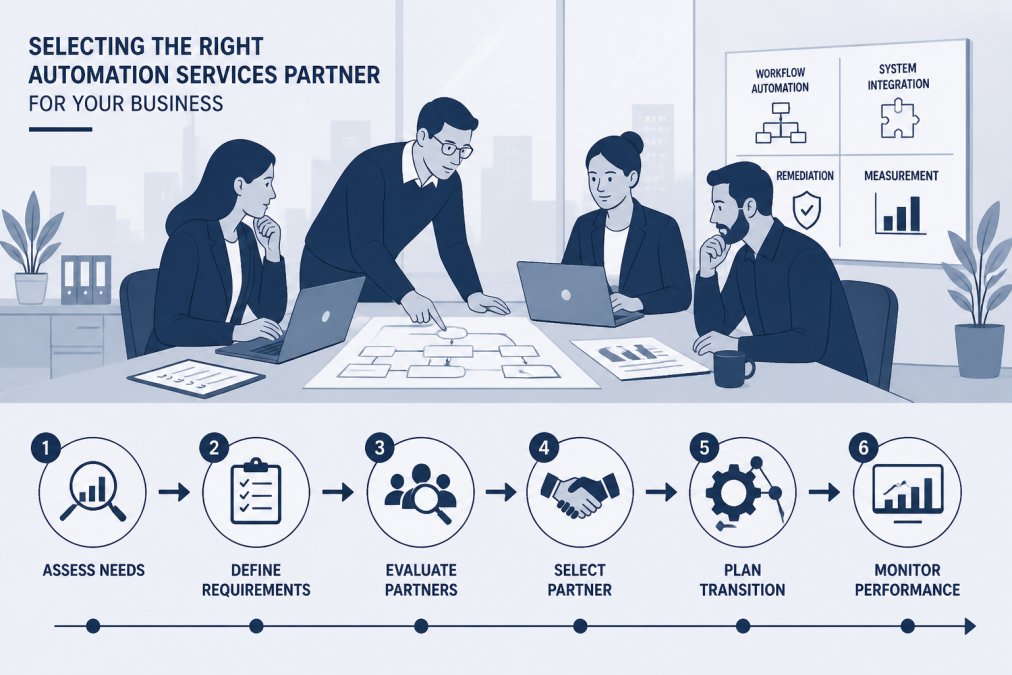
Start with your current state: what systems you use, which processes consume the most manual time, and your internal technical capability. Do you have developers on staff, or is your team primarily business-focused?
Next, evaluate each provider against three dimensions:
Integration capability. Does the provider work with your existing systems? Can they integrate Salesforce, your accounting software, your custom applications? Some providers have deep integration libraries; others require custom API work. Custom integration adds cost and timeline.
Implementation approach. Does the provider design and build workflows for you, or do you build them yourself? Services-based providers (like Equalpath) typically handle design and build.
Ongoing support and flexibility. Once workflows are deployed, how easy is it to modify them?
Use this simple comparison framework:
| Evaluation Criterion | Why It Matters | What to Ask |
|---|---|---|
| Integration with your systems | Determines implementation complexity and timeline | Can you integrate with our current applications? What custom work is required? |
| Service vs. software model | Affects internal resource requirements and flexibility | Do you build and manage workflows, or do we? |
| Implementation timeline | Impacts when you see results | How long from contract to first automated workflow? |
| Pricing model | Determines total cost of ownership | Is pricing fixed or usage-based? What's included vs. additional cost? |
| Flexibility for changes | Matters as business needs evolve | How easy is it to modify workflows after deployment? |
| Support and training | Affects your team's ability to operate independently | What training and support are included? |
Total Cost of Ownership and Implementation Considerations
Comparing automation services alternatives requires looking beyond the headline price to total cost of ownership.
A service-based provider like Equalpath typically charges for design, build, and deployment plus ongoing management.
Mid-market platforms like Workato often use a hybrid model: moderate licensing costs plus professional services for complex implementations.
The right choice depends on your situation:
- If you have limited technical staff and need automation deployed quickly, a service model often costs less overall despite higher per-month fees.
- If you have strong internal technical capability and want long-term flexibility, a software platform may be more cost-effective over time.
- If you're somewhere in between, a hybrid approach, using a platform for straightforward workflows and engaging services for complex integrations, balances cost and control.
Implementation timeline also affects cost: a quick implementation reduces consulting fees and internal disruption, while a phased approach spreads cost but delays results.
Most organizations implementing automation services see payback through reduced manual work, fewer errors, and faster process completion. The question isn't whether automation delivers ROI, it does.
Choosing an automation services alternative to Equalpath starts with clarity about what you're actually trying to solve. Are you automating internal workflows, marketing campaigns, or system integrations?
At Elevated Digital, we help organizations answer these questions and select automation services that actually align with how they work.
Frequently Asked Questions
What is the difference between automation software and automation consulting services?
Automation software provides tools and platforms you configure or deploy internally to handle workflow automation and process orchestration. Automation consulting services involve a partner who assesses your business processes, designs custom solutions, manages implementation, and often provides ongoing support. Consulting services typically include strategy, integration, training, and optimization, services that software alone cannot deliver. Many organizations benefit from combining both: software for execution and consulting for strategy and integration.
How do I know which automation services alternative is right for my business?
Evaluate alternatives based on your specific business requirements: the complexity of your workflows, your team's technical capacity, integration needs with existing systems, and your budget for implementation and support. Consider whether you need enterprise-grade robotic process automation, cloud-based workflow tools, or human-in-the-loop automation that combines automated and manual steps. Request case studies from consultancies that have worked with companies similar to yours, and ask about their approach to system integration and measurement.
What should I ask an automation services consultant before hiring them?
Ask about their experience with your industry and the specific business processes you want to automate. Request references from recent clients and ask how they measure success and ROI. Clarify their approach to integration with your existing systems (Salesforce, HubSpot, custom tools, etc.), how they handle change management with your team, and whether they provide post-implementation support. Understanding their methodology for workflow design, testing, and deployment will help you assess whether they match your organization's needs and culture.
How can I measure the results of an automated marketing workflow?
Track metrics that align with your business goals: lead generation volume and quality, conversion rates, time-to-close, cost per acquisition, and revenue impact. Measure process efficiency gains by comparing manual task time before and after automation. Monitor data quality and error rates, and assess team productivity, how much time your staff reclaims for higher-value work. A strong automation services partner will establish baseline metrics before implementation and provide regular reporting on workflow performance and ROI.
What business processes are the best candidates for automation?
Processes with high volume, repetitive steps, clear rules, and minimal exceptions are ideal for automation. Common candidates include lead qualification and nurturing, customer onboarding, invoice processing, data validation and file creation, and IT service management tasks. Processes involving human judgment or complex decision-making benefit from human-in-the-loop automation, where automated steps handle routine work and route exceptions to people. Evaluate processes by their frequency, cost, error rate, and impact on customer experience or operational efficiency.