 listicle
5 Best Workflow Automation Tools for Small Business
Table of Contents
- Best Workflow Automation Tools for Small Business: Quick Comparison
- Zapier: Connect Apps Without Code
- Make: Visual Workflow Builder for Teams
- n8n: Self-Hosted Automation Platform
- Jotform Workflows: No-Code Automation for Forms and Processes
- HubSpot: Business Workflow Automation Examples in Action
- How to Automate Business Processes: Getting Started
- Workflow Automation Best Practices for Small Teams
- Frequently Asked Questions
Last Updated: October 17, 2026
Best Workflow Automation Tools for Small Business: Quick Comparison
Small business owners juggle dozens of tasks daily. Email piles up, customer data scatters across platforms, and team members repeat the same manual steps. The friction builds and productivity stalls.
Workflow automation tools eliminate this friction by connecting your apps and automating repetitive tasks. Choosing the right one matters: the wrong pick wastes time and money, while the right one compounds efficiency gains daily.
We've analysed the leading workflow automation platforms for small business. Below, we compare the 5 best workflow automation tools for small business that deliver the most value for teams under 50 people, based on ease of use, integration breadth, and real-world ROI.
Quick Picks
- Best Overall: Zapier, connects over 7,000 apps with minimal setup
- Best Visual Builder: Make, drag-and-drop workflows for teams preferring visual logic
- Best Self-Hosted Option: n8n, full control for teams with technical capacity
- Best for Forms and Processes: Jotform Workflows, no-code automation built for form submissions
- Best for CRM Integration: HubSpot, workflow automation examples embedded in a full business platform
| Tool | Best For | Standout Feature | Setup Time |
|---|---|---|---|
| Zapier | Connecting common apps | 7,000+ integrations | Minutes |
| Make | Visual workflow builders | Drag-and-drop logic | 15-30 minutes |
| n8n | Technical teams | Self-hosted deployment | 30-60 minutes |
| Jotform Workflows | Form automation | No-code form workflows | 10-20 minutes |
| HubSpot | Sales and marketing | Native CRM workflows | 20-40 minutes |
Zapier: Connect Apps Without Code
Zapier is the most straightforward entry point for small businesses automating between tools. It connects more than 7,000 apps, from email and CRM platforms to accounting and messaging tools. You pick a trigger, choose an action, and Zapier handles the rest.
Setup takes minutes with no code required, so a small team can have its first automation running before lunch.
The real strength lies in breadth. If you use common business software, Gmail, Slack, Salesforce, Stripe, Shopify, Airtable, Zapier likely supports it, making it a unified backbone for fragmented systems.
The tradeoff is complexity. Zapier's builder handles straightforward sequences well, but workflows with conditional branching become harder to visualize and maintain, leaving you building workarounds instead of workflows.
For most small businesses under 20 people, Zapier handles the automation needs that matter most. It's the pragmatic choice when speed and simplicity outweigh advanced features.
Make: Visual Workflow Builder for Teams
Make prioritizes the visual workflow builder. Instead of text-based configuration, you see your entire automation as a flowchart, with each app a node and each connection a line. This appeals to teams who think in diagrams.
The platform excels at workflows that branch. If a customer's order exceeds a certain amount, trigger one action. If it's below that threshold, trigger another. Make's visual builder makes these conditional paths obvious at a glance.
Setup takes 15 to 30 minutes for a moderately complex workflow. The learning curve is gentler than code-based platforms but steeper than Zapier, though teams with a detail-oriented operations manager or technically curious founder usually find Make intuitive.
Where Make falls short is in the ecosystem. It connects to fewer apps than Zapier. If your tech stack includes niche or newer tools, Make might not support them. For standard business software, coverage is solid. For edge cases, you may hit a wall.
n8n: Self-Hosted Automation Platform
n8n appeals to teams with technical capacity and security concerns. Unlike Zapier and Make, which run on vendor-managed cloud servers, n8n runs on your own infrastructure, so your data stays in your environment, which matters for sensitive customer information or strict compliance requirements.
The trade-off is operational burden. Self-hosting requires someone who understands servers, databases, and deployment. Without a dedicated IT person, this becomes a liability, since you're responsible for updates, backups, and troubleshooting.
n8n's workflow builder is code-forward. It supports JavaScript for advanced logic. This flexibility is powerful for teams with a developer on staff. For non-technical teams, the learning curve is steep.
The platform works best as a longer-term investment. You spend weeks setting it up, but once deployed, you own the entire system with no vendor lock-in or third-party feature deprecation.
Jotform Workflows: No-Code Automation for Forms and Processes
Jotform Workflows solves a specific problem: automating what happens after someone fills out a form. A submission can trigger a follow-up email, create a task in your project management tool, or auto-populate a spreadsheet.
The platform is built for this use case. No-code workflow creation means any team member can build these automations without technical training, and setup takes 10 to 20 minutes for most scenarios.
Jotform Workflows shines when forms are central to your business. If you collect leads, intake information, or feedback through forms, the automation picks up where the form ends, eliminating manual data entry and follow-up delays.
The limitation is scope. Jotform Workflows excels at form-triggered automation but doesn't match the breadth of integrations or the sophistication of more general-purpose platforms. If your automation needs extend beyond forms, syncing data between your CRM and accounting software, for example, you'll need a second tool.
For small service businesses, freelancers, and teams collecting client information through forms, Jotform Workflows often solves 80% of automation needs at a fraction of the complexity.
HubSpot: Business Workflow Automation Examples in Action
HubSpot bundles workflow automation into a larger CRM and business platform. What matters is what this enables: workflows built directly into the tools where your sales and marketing teams already work.
Sales teams use HubSpot to track deals. Marketing teams use it to nurture leads. Workflows inside HubSpot automate the handoff between these functions. A lead reaches a certain score, a workflow moves them to the sales queue and notifies the sales team. A deal closes, a workflow triggers a customer success onboarding sequence.
The strength is integration depth. HubSpot's workflows have native access to every CRM field, so you're automating within a unified system rather than bridging systems, which reduces friction and data loss.
The cost is vendor consolidation. HubSpot's pricing reflects a full platform, not just automation. If you're already using HubSpot for sales or marketing, adding workflows is natural. If you're evaluating it specifically for automation, compare the total cost against point solutions like Zapier.
Business workflow automation examples in HubSpot often centre on lead management, deal progression, and customer communication. These are high-value workflows for B2B businesses and service companies. For e-commerce or operations-heavy businesses, the value proposition weakens.
How to Automate Business Processes: Getting Started
Workflow automation isn't magic; it's methodical. The difference between success and failure often comes down to planning.
Start by identifying your most painful repetitive task. Not the most complex one. The one that wastes the most time and creates the most friction. Common examples: manual data entry, approval routing, customer notifications, or lead assignment.
Map the current process: write down every step, who does it, what tools are involved, where errors happen, and where it stalls. This map becomes your blueprint.
Next, identify the trigger and the desired outcome. What event should start the automation? What should happen as a result? A new form submission triggers an email and a task. A deal closes, triggering a customer onboarding sequence. A support ticket arrives, triggering a Slack notification to the right team member.
Choose your platform based on the tools you already use. Zapier handles common business software, Make suits visual workflow building, Jotform Workflows fits form-centric automation, and HubSpot's native workflows suit existing HubSpot users.
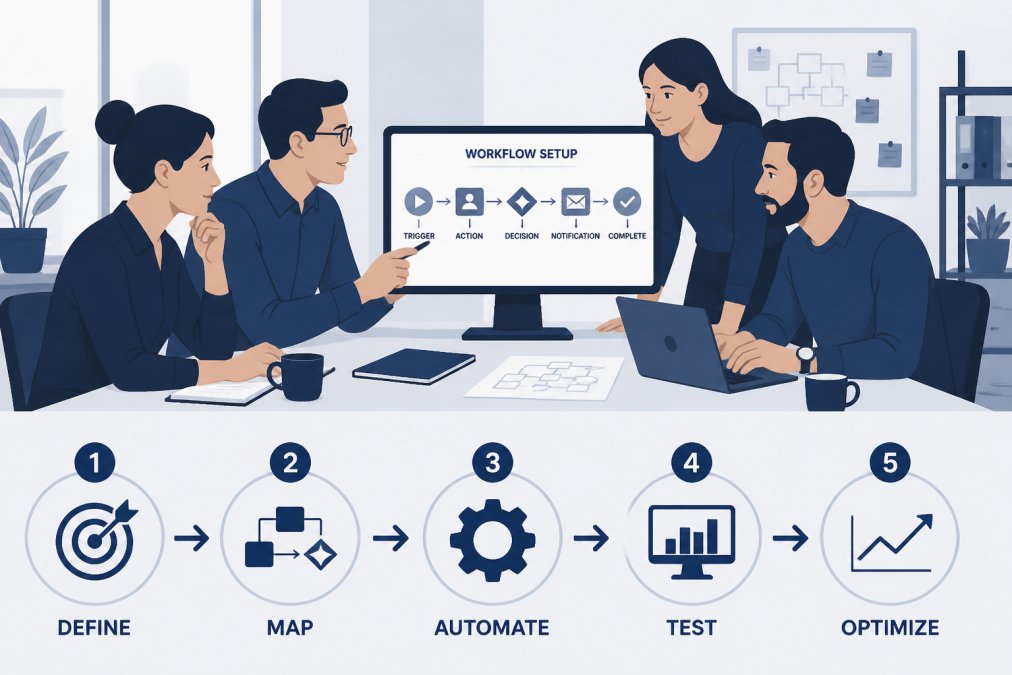
Test with a pilot. Automate one step rather than your entire onboarding process, let it run for a week, and measure whether it saved time, reduced errors, or created new problems. Once confident, expand.
Document what you've built. Include the trigger, the actions, any conditions, and the expected outcome. When team members leave or new people join, this documentation becomes invaluable. It's also your insurance policy if something breaks.
Workflow Automation Best Practices for Small Teams
Most small business automation fails not because the tool is wrong, but because the process wasn't ready. Automating a broken process just makes it faster and more consistently broken.
Before you automate, standardise. Make sure the manual process works the same way every time. If three team members do the task three different ways, automating creates chaos. Standardise first, then automate.
Choose workflows that scale with your team. Skip tasks that happen twice a month and focus on daily or weekly repetition, where savings compound: 10 minutes a day adds up to 40 hours a year for one person.
Monitor your automation regularly. Check that it's running as expected. Set up alerts if something fails. A broken automation that nobody notices becomes a silent productivity killer. Slack notifications, email summaries, or a simple dashboard showing automation health all work.
Build incrementally. One successful automation builds credibility and confidence. Your team sees the value. The next automation is easier to sell. Three months in, you've automated five processes and freed 10 hours a week. That's real ROI.
Frequently Asked Questions
What are the best workflow management tools for small businesses?
The best workflow automation tools for small business depend on your specific needs. Zapier excels at connecting existing apps with minimal setup. Make and n8n offer visual builders for custom workflows. HubSpot works well for businesses focusing on marketing and sales automation. Jotform Workflows is ideal if you need to automate processes triggered by form submissions. Evaluate based on the apps you already use, the complexity of your workflows, and whether you prefer no-code simplicity or more technical control.
How can workflow automation tools connect business apps?
Workflow automation platforms use APIs and connectors to link your existing business software. When an event occurs in one app (a trigger), the automation tool sends data to another app to perform an action. Zapier connects over 7,000 apps, making it straightforward to link common tools. Make and n8n use visual workflow builders where you define triggers and actions. This eliminates manual data entry between systems and reduces errors. Most platforms support common business apps like CRM systems, email, accounting software, and project management tools.
What tasks can small businesses automate with workflow tools?
Small businesses can automate repetitive manual tasks including lead capture and assignment, email notifications and follow-ups, data entry between systems, invoice and expense processing, customer support ticket routing, team task creation from customer requests, approval workflows for purchases or content, and report generation. The best candidates for automation are tasks that happen regularly, follow predictable rules, and don't require human judgment. Starting with high-volume, time-consuming tasks delivers the fastest return on investment.
How do small businesses choose workflow automation software?
Start by identifying your most time-consuming manual processes and the apps involved. Check whether your existing tools are supported by each platform. Consider ease of setup: Zapier and Jotform Workflows prioritise quick implementation, while n8n offers more control for technical teams. Evaluate pricing against your workflow volume and team size. Test the platform with a free trial or low-cost plan on a single workflow before committing. Look for platforms with clear documentation and responsive support, since implementation issues can delay productivity gains.