 ultimate-guide
Digital Automation Strategies for Professional Services
Table of Contents
- What Digital Automation Means for Professional Services
- Core Areas Where Automation Delivers Real Impact
- Building Your Automation Strategy Framework
- Automating Client Onboarding Workflows
- Measuring Automation Performance Metrics That Matter
- When to Hire a Website Automation Consultant
- Common Mistakes That Derail Automation Projects
- Scaling Operations Through Digital Transformation
- Frequently Asked Questions
Last Updated: August 28, 2026
What Digital Automation Means for Professional Services
Digital automation strategies have become essential for professional services firms competing in 2026. At Concierge Brokers, we've seen firsthand how automation transforms operations by eliminating the friction that keeps skilled professionals from doing their best work.
Manual, repetitive tasks drain time and introduce errors. When a lawyer manually logs hours, when an accountant re-enters data across systems, when a consultant spends time on client intake forms instead of strategy, that's lost productivity. Digital automation redirects that effort toward billable work and client outcomes. For professional services, automation isn't a luxury, it's the difference between scaling your firm and hitting a wall at your current team size. Firms typically discover that a significant portion of their operational time vanishes into tasks that machines should handle.
Core Areas Where Automation Delivers Real Impact
Not all automation is equal. The key is targeting the right processes first.
Client onboarding and intake workflows
Client onboarding is where most professional services firms can improve efficiency. A prospect signs an engagement letter, and someone manually creates a file, sends welcome emails, collects questionnaires, chases missing signatures, and sets up access credentials. This process can involve fragmented work over several days.
Automated onboarding compresses it into hours. When a contract is signed or payment clears, an automation workflow triggers immediately. Welcome emails send automatically. Digital intake forms populate your CRM without manual data entry. Missing documents generate automatic reminders. Access credentials deploy to the right systems. Your team gets a clean handoff, and your people can focus on delivery from day one. Every client experiences the same professional, thorough onboarding with no steps skipped.
Billing, invoicing, and financial reporting
Time tracking and billing drain efficiency. A consultant logs hours in one system, those hours move to your billing platform, expenses get entered separately, invoices generate manually, and payment tracking happens in email or spreadsheets.
Automating this workflow has direct financial impact. When time entries automatically flow to billing, invoices generate faster. When expense receipts auto-populate from email or credit card feeds, you capture costs that usually get missed. When invoice status updates trigger automatically, you reduce days sales outstanding. For a firm, even a modest improvement in billing velocity and cost capture translates to meaningful cash flow gains (peer-reviewed research).
Resource allocation and scheduling
Professional services firms live or die on utilisation (the NIH). Are your people billable? Are they on the right projects? Is capacity being wasted on low-margin work?
Automation gives you real-time visibility. When project managers update status, scheduling tools automatically flag conflicts and gaps. When a project ends, automation can trigger resource reallocation workflows. When someone becomes available, the system flags matching opportunities across active projects. This removes the administrative overhead that prevents good resource decisions from happening quickly.
Building Your Automation Strategy Framework
Most firms pick a tool, implement it, and wonder why adoption is poor. The real work happens before you buy anything.
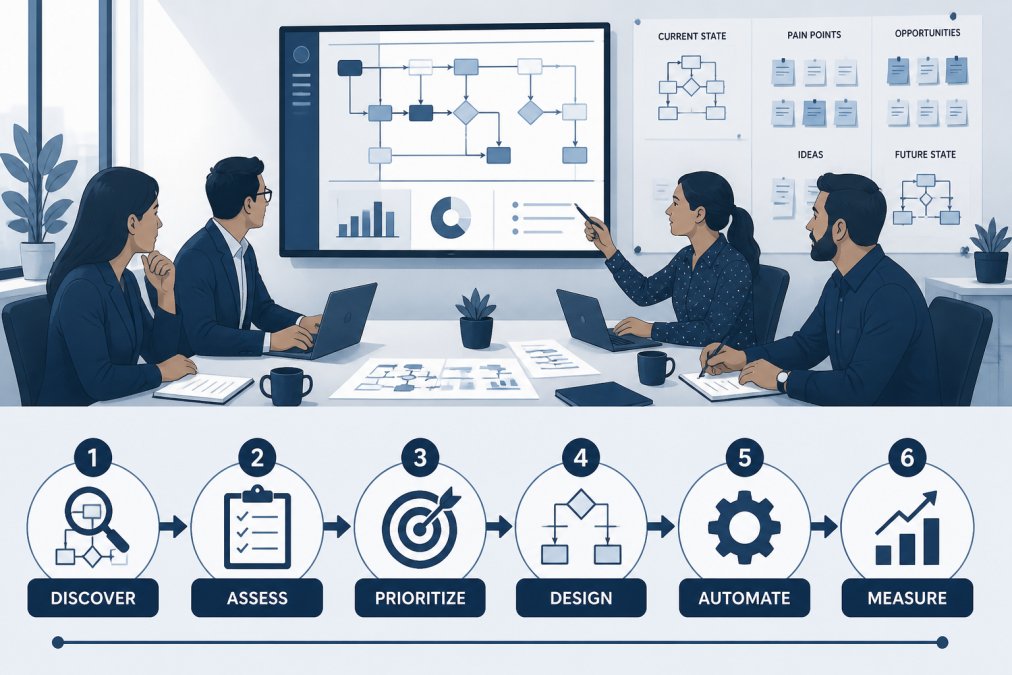
Step 1: Map your current processes and identify bottlenecks
Document what actually happens today. Walk through a client engagement from start to finish. Track where data moves between systems. Note where someone waits for another person. Identify steps that exist only because of a previous system limitation.
This mapping exercise usually reveals surprises: processes nobody remembers why they exist, similar work being done three different ways, and information transcribed manually because systems don't talk to each other. Bottlenecks matter most, a step that delays everything downstream. If client intake takes time because one person reviews documents, that's a bottleneck. Bottlenecks are where automation delivers the highest impact.
Step 2: Define automation priorities based on impact and effort
Create a simple matrix: impact (high to low) on one axis, effort (high to low) on the other. Target high-impact, low-effort opportunities first. These quick wins build momentum and prove automation's value to sceptical teams. High-impact, high-effort projects come next. Low-impact work gets deferred or skipped.
Step 3: Select tools that integrate with your existing systems
Many automation projects fail because new tools don't talk to your CRM, billing system, or document management platform. Data has to be manually moved between systems, adding friction instead of removing it.
Before selecting any tool, map your existing technology stack. Identify systems that hold critical data: your CRM, accounting software, project management platform, and document repository. Any new automation tool needs to integrate cleanly with these systems. Integration can happen through native connections, API-based integration, or middleware platforms like Zapier.
Step 4: Plan for change management and staff adoption
This step gets skipped most often, and it's why automation projects underperform. You can have perfect technology and still fail if your team doesn't adopt it.
Change management means explaining why the change is happening, how it affects daily work, and what support staff will receive. It means training people on new workflows, addressing concerns honestly, and measuring adoption. Firms that succeed treat automation as a people problem, not a technology problem (peer-reviewed research). They involve frontline staff in planning, pilot with early adopters, and celebrate wins.
Automating Client Onboarding Workflows
Client onboarding automation is one of the highest-impact, lowest-effort automation opportunities for professional services firms.
Start by defining your ideal onboarding sequence. What information do you need from the client? What access do they need? What documents need to be signed? Then map that sequence to your existing systems. When a contract is signed, can that trigger a workflow? When payment clears, can that send a welcome email? Can intake forms auto-populate your CRM?
Start with the most critical steps: contract signature, payment confirmation, welcome communication, and access provisioning. These four steps alone can significantly compress onboarding time. As you refine the process, add complexity: automated follow-ups for missing documents, conditional logic that adjusts based on service type, and integration with your project management system.
Measure the impact: days to full onboarding, percentage of clients fully onboarded on schedule, and time your team spends on onboarding tasks.
Measuring Automation Performance Metrics That Matter
You can't improve what you don't measure. But not all metrics are equally useful.

Hours saved and operational efficiency gains
Track how much time the automation actually saves. If client onboarding used to take a certain number of hours per engagement and now takes less, that's a measurable gain. Multiply that by your annual volume. This can represent significant capacity freed up for billable work or growth activities.
Error reduction and quality improvements
Automation eliminates certain categories of error entirely. Manual data entry errors disappear when data flows directly between systems. Missed steps vanish when workflows enforce sequence. Track error rates before and after: data entry mistakes, missing documentation, missed follow-ups, and rework cycles. Even modest error reduction has financial impact.
Client satisfaction and service delivery speed
Faster onboarding means clients get to work sooner. Fewer errors mean fewer frustrations. Better visibility into project status means better communication. Measure client satisfaction through surveys or NPS scores. Track service delivery speed, how quickly does work move from intake to completion?
When to Hire a Website Automation Consultant
Most professional services firms have limited in-house automation expertise. A consultant makes sense when you're building workflows that require integration across multiple systems, your team lacks bandwidth or expertise to implement automation, you're scaling automation across the firm, or you need to navigate change management.
The key is finding a consultant who understands your business model and technology stack. A consultant specialising in professional services automation will move faster than a generalist.
At Concierge Brokers, we work with professional services firms on this challenge. We map your processes, identify high-impact automation opportunities, select and integrate tools, and guide your team through adoption. The goal is measurable performance outcomes, actual improvements in efficiency, quality, and client experience.
Common Mistakes That Derail Automation Projects
Automating the wrong process first. Firms automate something because it's easy, not because it moves the needle. Start with impact analysis, not ease.
Choosing tools before understanding your process. A firm buys a platform, then forces their workflow into it. Map your process first, then choose tools that fit.
Underestimating integration complexity. Connecting systems is harder than it looks. Budget sufficient time and resources for integration.
Skipping change management. People revert to old workflows because they're familiar. Invest in training, communication, and support.
Measuring the wrong things. Track business metrics (time saved, errors reduced, revenue impact) instead of technology metrics (workflows created, systems integrated).
Treating automation as a one-time project. Processes evolve. New bottlenecks emerge. Successful automation requires ongoing refinement.
Scaling Operations Through Digital Transformation
Automation isn't just about efficiency. It's about what becomes possible at scale.
A solo consultant can deliver excellent work for a certain number of clients. Beyond that, something breaks. Digital transformation is how you scale without proportionally scaling headcount. When you automate onboarding, billing, scheduling, and reporting, you free your team to focus on delivery and growth.
Some firms discover that automation makes new service models viable. A consulting firm might offer fractional CFO services to small businesses, which is only economically viable if financial reporting is largely automated. An accounting practice might offer real-time financial advisory instead of annual reviews, again only possible if underlying data flows are automated.
The firms winning in 2026 aren't necessarily the ones with the smartest people. They're the ones who've eliminated friction between strategy and execution. They've built systems that work at scale.
The challenge most professional services firms face isn't finding work. It's delivering work efficiently at scale without burning out your team. Digital automation strategies address this directly. By eliminating manual friction, integrating your systems, and automating repetitive workflows, you create space for your people to do their best work and for your firm to grow.
Concierge Brokers specialises in exactly this problem. We work with professional services firms to map processes, identify automation opportunities, implement integrated solutions, and guide teams through adoption. Our focus is on defensible, measurable outcomes. If your firm is ready to scale operations through automation, reach out to discuss your specific challenges and how we can help.
Frequently Asked Questions
What are the core pillars of digital transformation for service firms?
Digital transformation for professional services rests on four pillars: process optimization (eliminating manual tasks and bottlenecks), technology integration (connecting CRM, scheduling, and billing systems), talent development (upskilling staff to work with new tools), and performance measurement (tracking ROI and operational gains). Success requires attention to all four, technology alone won't deliver results if processes remain fragmented or staff lack training.
How do you measure the ROI of automation in a professional services environment?
Track three measurable outcomes: hours recovered per week (time previously spent on manual tasks), error reduction rates (fewer billing mistakes, missed follow-ups, or data entry errors), and client satisfaction metrics (faster turnaround, fewer delays). Calculate the annual value of recovered hours against billable rates, then compare to the cost of automation tools and implementation. The timeframe for positive ROI can vary depending on the specific implementation and firm.
What are the most common risks when implementing automation in professional services?
The biggest risks are staff resistance (teams fear job loss or disruption), poor system integration (tools that don't talk to each other create new bottlenecks), and inadequate change management (rolling out automation without training). Additionally, automation can expose data security or compliance gaps if not properly scoped. Mitigate these by involving staff early, ensuring your consultant validates system compatibility, and running a pilot before full rollout.
How does professional service automation (PSA) differ from general business automation?
PSA focuses specifically on the service delivery lifecycle: client intake, project scoping, resource allocation, time tracking, billing, and outcomes measurement. General business automation addresses any repetitive task. For professional services, the difference matters because your revenue depends on billable hours, client satisfaction, and resource utilization, metrics that PSA tools are built to optimize. Generic automation platforms may lack the financial reporting and project tracking depth you need.